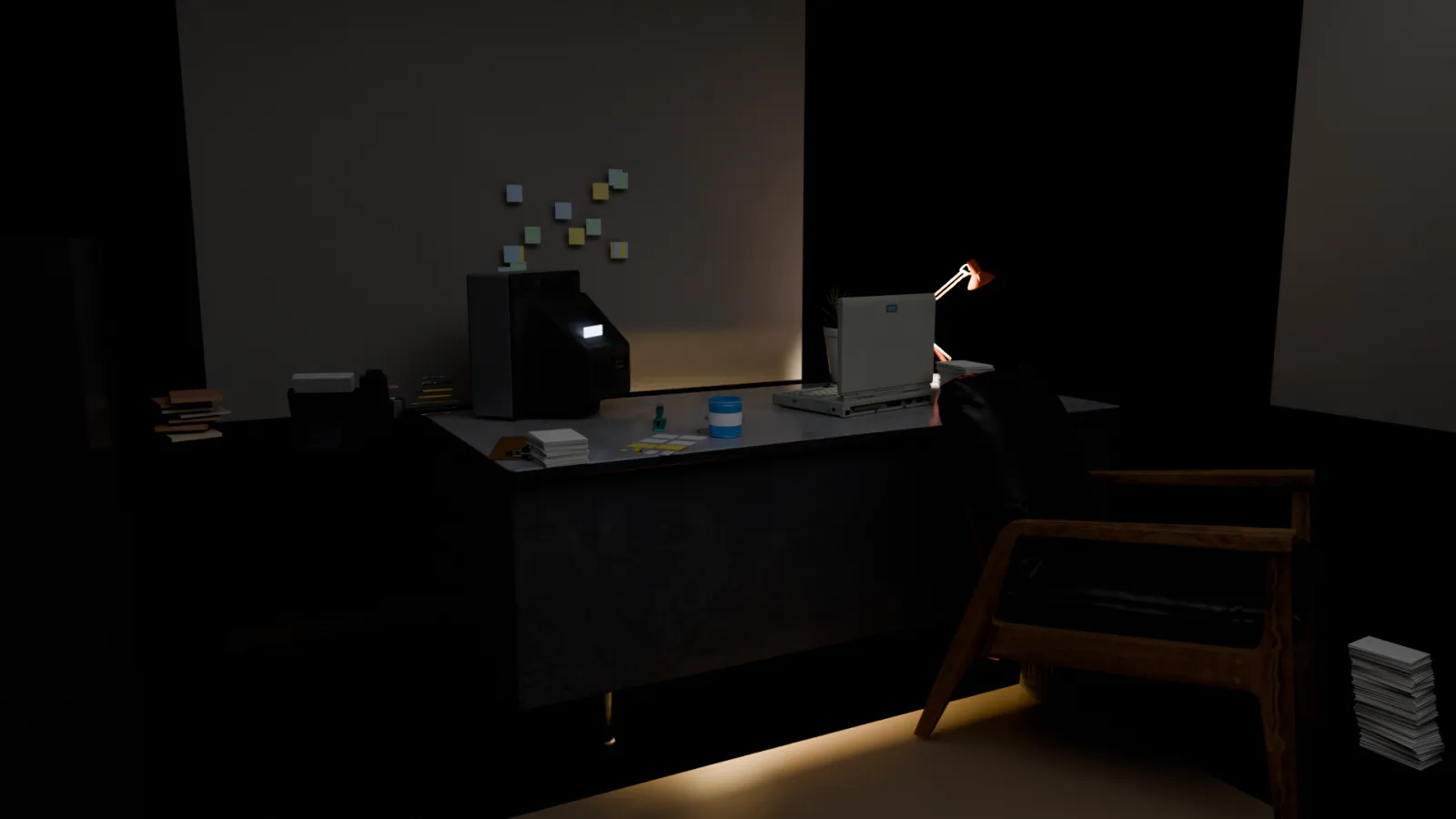
Nobody modeled this office. No mouse, no viewport, no artist: Python scripts written by an AI agent, executed by Blender from the command line. The same code then squeezed the whole set into 6.6 MB so it can run inside a web page. The notebook follows, real code included.
The problem
Our web experiences call for sets that can sit next to a film frame: soft light, believable mess, depth of field. Except those sets have to run at 60 frames per second on a phone. Cycles takes minutes to compute one image; the browser gets 16 milliseconds. The two worlds don't talk.
The other given: no 3D artist on the team. The studio is one human who decides and one AI agent that executes. So Blender was never going to be opened. It was going to be driven.
Blender without an interface
Blender ships a full Python interpreter, bpy, and is perfectly happy running without its interface. The whole scene fits in a program:
/Applications/Blender.app/Contents/MacOS/Blender \
  --background --python build_office.py -- --render
While building, the agent sees nothing. It describes, in meters. The room is 4.2 m by 5.2 m: boxes, plainly, down to the right-hand wall, cut into four panels to make room for the window:
box('floor',  (4.2, 5.2, 0.05), (0, 0, -0.025), WOOD)
box('wall_back', (4.2, 0.06, 3.0), (0, -2.6, 1.5), WALL)
# Right wall PIERCED by a window (opening y -1.35..0.15, z 0.85..2.5)
box('wall_right_a', (0.06, 5.2, 0.85), (2.1, 0, 0.425), WALL)  # below the window
box('wall_right_b', (0.06, 5.2, 0.5),  (2.1, 0, 2.75),  WALL)  # above it
None of the furniture was modeled. Everything comes from Poly Haven, a CC0 library of scanned objects with an API: the metal desk, the armchair, the articulated lamp, the CRT television, the 90s laptop. One function, place(), imports each object, measures it, rescales it and sets it on the floor. A set decorator's reasoning: this desk is 78 cm tall, it goes there, turned like this.
desk  = place(import_asset('polyhaven/desk', 'desk'), target_h=0.78, loc=(-0.5, -1.85, 0))
chair = place(import_asset('polyhaven/office-chair', 'chair'), target_h=0.95,
              loc=(-1.05, -0.8, 0), rot_z=math.radians(210))
crt   = place(import_asset('polyhaven/crt-tv', 'crt'), target_h=0.42,
              loc=(0.15, -2.1, DESK_TOP), rot_z=math.radians(42))
The mess is code too
A tidy desk tells no story; this one needed a past. The clutter.py module imports no assets. Primitives and rules, nothing else. Stacks of A4 never quite straight, mismatched folders, cables sagging in catenaries, fourteen sticky notes. Each pile has its own random seed and its messiness parameter: at 0 the pile is neat, at 1 the script's comment calls it “end-of-night chaos”:
clutter.paper_stack((-1.0, -1.55, DESK_TOP), height=0.16, seed=3, messiness=1.0)
clutter.folder_stack((1.1, -2.2, DESK_TOP), count=7, seed=5)
clutter.cable((0.15, -2.3, DESK_TOP), (0.9, -2.5, 0.05), sag=0.25, seed=11)
clutter.postits((-0.1, -2.555, 1.35), 'y', count=14, seed=9)  # stuck to the wall
Light makes the film
Four sources. The desk lamp, warm, carrying the whole scene. City light, cold, through the venetian blinds. The screens. And a drawer left ajar, leaking golden light. What it holds is not for this notebook.
key.data.energy = 180
key.data.color  = (1.0, 0.78, 0.5)          # the lamp: warm, the key
moon.data.color = (0.6, 0.71, 0.95)         # the city: cold, through the blinds
box('drawer_gold', ..., emit=(1.0, 0.72, 0.28), strength=90)   # the drawer
scene.view_settings.view_transform = 'AgX'  # + 'AgX - Punchy' look
Everything goes through the AgX color transform, the one that rolls highlights off gently instead of clipping them to white the way 3D renders did a decade ago.
The agent proofreads itself
The first render was not good.
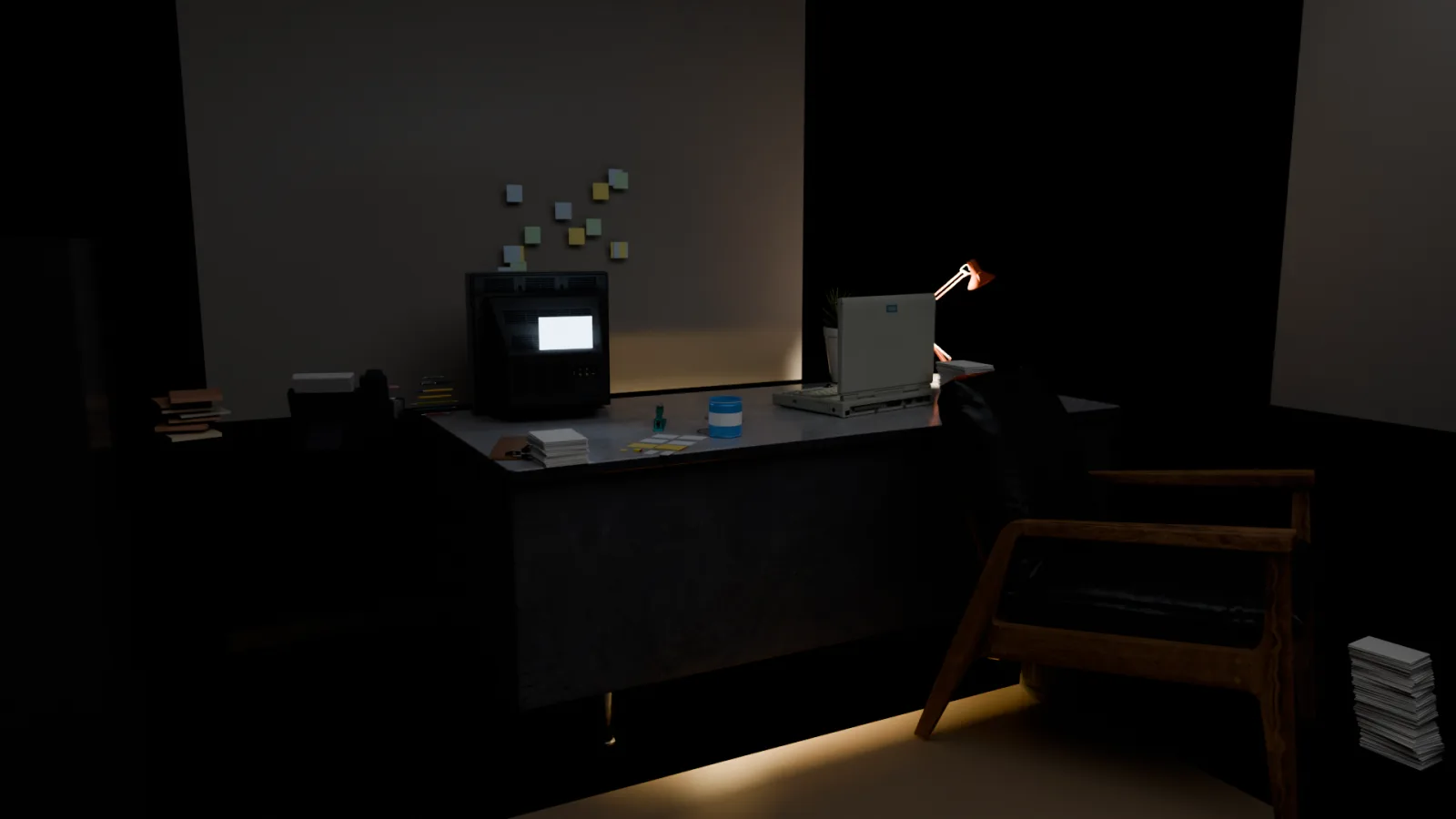
Nobody stepped in between these two images. The agent rendered the scene, looked at the result, noticed the overexposed screen staring into the camera, and fixed its own script: the set pivots toward the chair, the emission drops, the tint cools. The correction a DoP would make by eye, done here by rereading code.
The numbers, on a plain MacBook M1
- ≈ 3 min 20 per 1080p frame, 256 adaptive samples, GPU denoising
- 63 MB the source scene (.blend), hundreds of objects
- 6.6 MB the same set, browser-ready
- 0 clicks inside Blender's interface
The bridge to the browser: baking the light
No phone will ever compute this lighting live, and it doesn't have to. The trick is as old as video games: compute the light once, then paint it onto the walls. That is baking.
The second script merges the scene into two objects, the shell (walls, floor, ceiling, blinds) and the stuff (furniture, mess), unwraps each onto a fresh UV atlas and bakes the Cycles lighting into two textures. Then it swaps the materials. The exported file contains not one lamp: the light has become the texture. The screens and the drawer's gold stay emissive; those keep living in real time:
groups = {'shell': walls_floor_ceiling, 'stuff': everything_else}
bpy.ops.uv.smart_project(island_margin=0.002)
bpy.ops.uv.pack_islands(margin=0.003)   # otherwise islands pile up in a corner
bpy.ops.object.bake(type='COMBINED', margin=8, use_clear=True)
bpy.ops.export_scene.gltf(filepath='office_baked.glb', export_format='GLB')
Three traps hit along the way:
1. The baked image must be saved manually by script: the bake's automatic save is broken in headless mode.
2. Without pack_islands after unwrapping, all UV islands pile up in one corner of the atlas.
3. On M1, a GPU bake can produce artifacts: re-running that same bake on CPU removes them.
At the end of the chain: a 6.6 MB GLB that three.js loads like any other model. Except this one ships cinema-grade lighting that no longer costs anything to compute.
What this changes, for your business too
This notebook isn't here to sell 3D. 3D is our test bench, the toughest we've found: geometry, light and performance budgets all have to be right at once. What matters is the mechanism underneath: an AI agent can drive any software that can be automated through code. It doesn't click faster than a human. It writes, it runs, it reads the result, it corrects itself.
Put your ERP, your planning tool or your document pipeline where Blender sits: the loop doesn't change. It's the one we install at our clients'.